Listen to the meeting.
We'll handle the notes.
One tap to record. Walk away with a full transcript, every speaker labeled, and an AI summary that pulls out the key points, action items, decisions, and open questions.
Built for the moment after the meeting ends. When the notes still need to exist.
Live recording
Capture meetings, lectures, and voice memos with real-time waveform feedback. Pause and resume — never lose a thought mid-sentence.
Import anything
Drop in a Zoom call, a Voice Memo, an MP4 from your phone — any audio or video file. Clarity Notes does the rest.
Speaker ID
Every voice gets a label. Rename Speaker 1 → Sarah once and the whole transcript updates. See exactly who said what.
Structured summaries
Four crisp categories — Key Points, Tasks, Decisions, Questions. No wall of text. Just structure you can scan in 30 seconds.
Three views
Toggle between full transcript, speaker breakdown, and AI summary. Same recording, three lenses on it.
Any language
English, Spanish, French, Mandarin, Arabic, Japanese — and dozens more. The AI summary follows the language being spoken.
Three screens. One workflow.
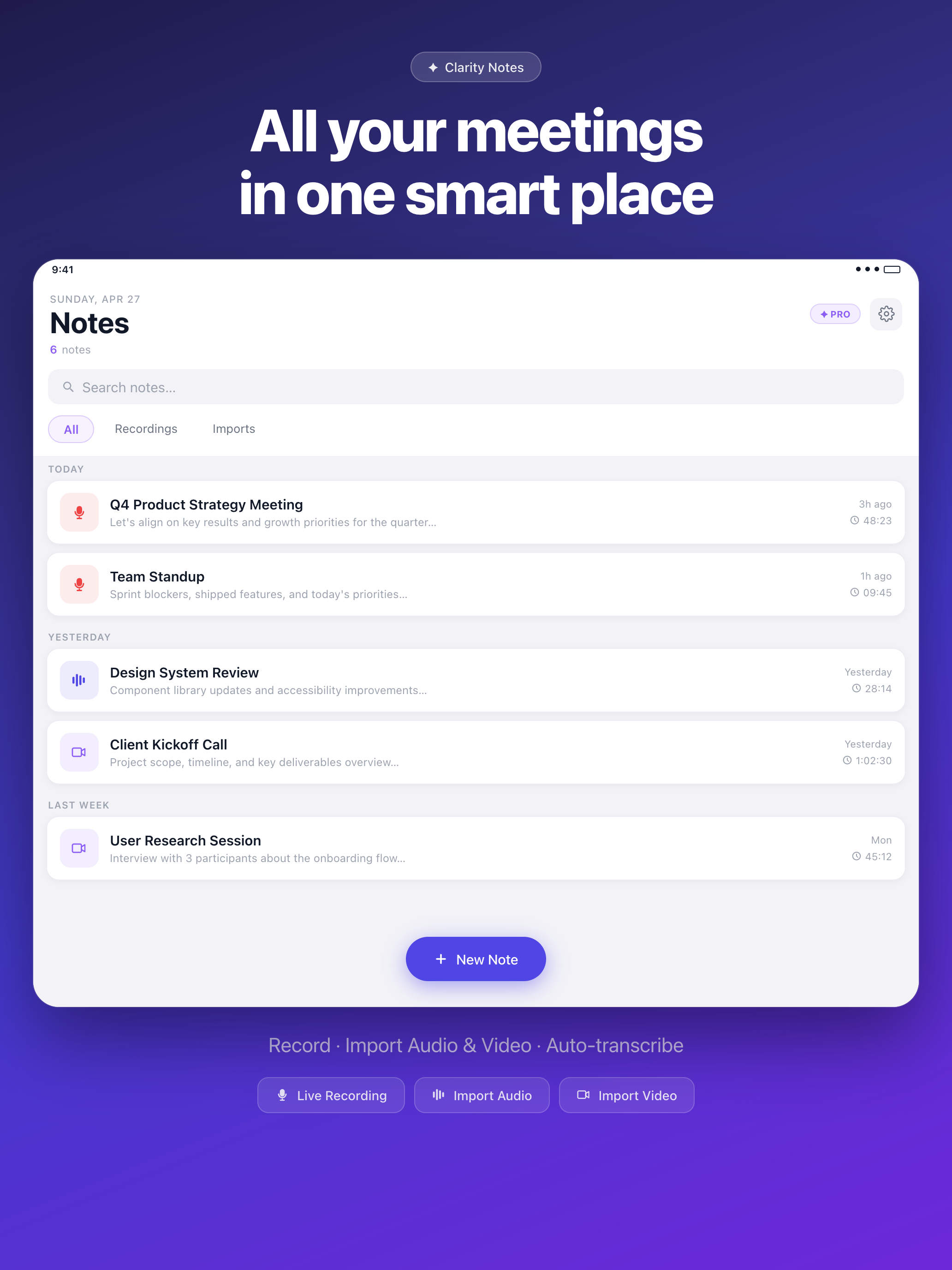
All your meetings, one smart place.
Recordings, imports, and live notes — sorted automatically by date. Search across every transcript you've ever made. Filter by recordings, imports, or everything at once.
- Auto-titled by AI from the conversation itself
- Full-text search across transcripts and summaries
- Swipe to delete · share or export
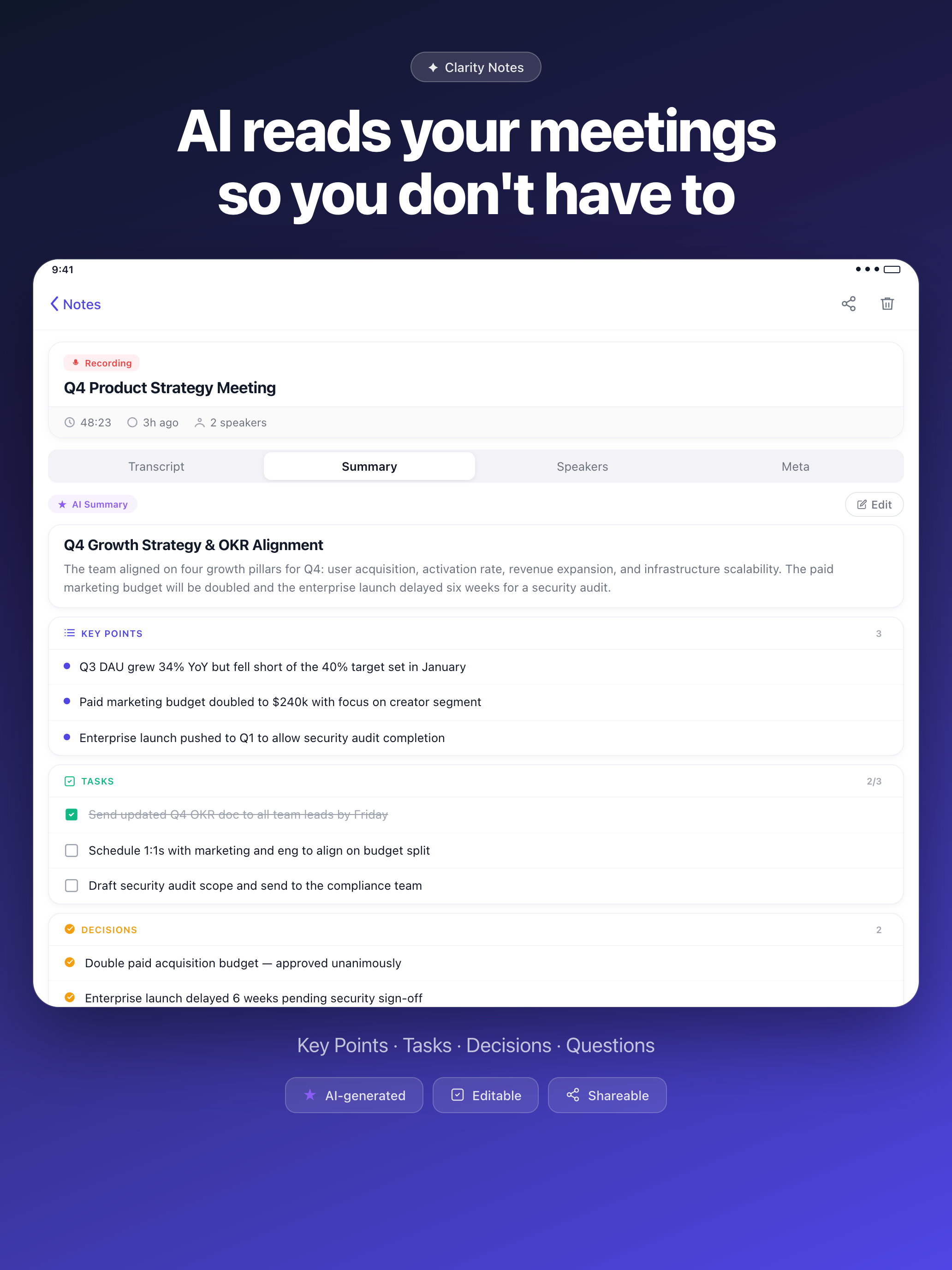
AI reads your meetings so you don't have to.
The hour-long meeting becomes a single screen. Key points, who committed to what, what was decided, what's still open. Tap a task to mark it done. Edit anything you want.
- Key Points — what was actually discussed
- Action Items — who committed to what
- Decisions — what was agreed, on record
- Questions — what still needs an answer
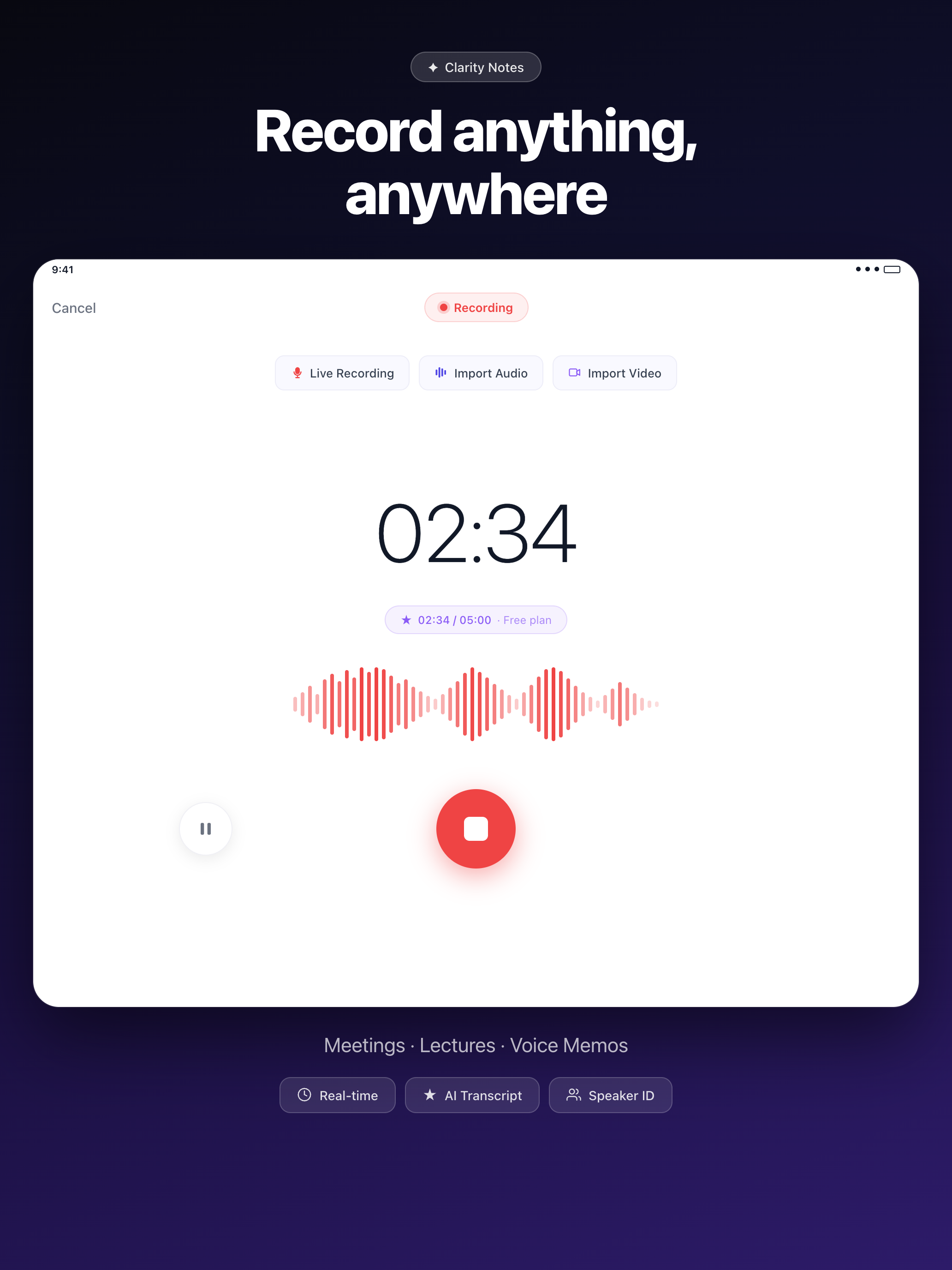
Record anything, anywhere.
Standups, sales calls, lectures, interviews, voice memos to yourself in the car. Background recording keeps running while you switch apps. Multi-hour sessions on Pro.
- Live waveform with audio-level metering
- Pause and resume mid-recording
- Plays back in-app — no need to leave the note
For people who can't afford to miss a word.
My fifth meeting just ended and I still don't remember if she said Tuesday or Thursday.
I'm two hours into the interview, my pen ran out, and the best quote is still coming.
The professor moved on three slides ago and I'm still copying the last one.
The client says we never agreed to that scope. I need a record of every conversation.
Three steps. That's it.
Tap record — or import
Hit the big red button before the meeting starts, or drop in a file you already have. Up to 5 minutes free; unlimited on Pro.
Walk away
The audio uploads, transcribes, and gets a clean speaker breakdown. Background-safe — switch apps, lock the screen, do your thing.
Read the summary
A few minutes later your phone has the structured version. Decisions, tasks, questions, and the full transcript — neatly filed.
Free to try. Pro when you need it.
Three days free on either plan. Cancel anytime from your Apple ID.
- Unlimited recordings
- AI summaries on every note
- Speaker identification
- Multi-language support
- Everything in Weekly
- Long-form recordings
- Family Sharing supported
- First access to new features
Free plan: 1 note, up to 5 minutes · Subscriptions managed in your Apple ID
Things people actually ask.
How accurate are the transcripts?
Clarity Notes uses state-of-the-art speech recognition. In clean audio with native speakers it routinely hits 95%+ word accuracy. Background noise, heavy accents, and crosstalk drop that — you can always tap into the transcript to fix anything.
What languages are supported?
Transcription works in English, Spanish, French, German, Italian, Portuguese, Russian, Mandarin, Japanese, Korean, Arabic, Hindi, and dozens more. The AI summary follows the language of the conversation — so a French meeting gets a French summary.
Can I record meetings on Zoom, Google Meet, or Teams?
Yes — two ways. Record the meeting room directly with your phone's microphone, or export the call recording afterwards (Zoom and Meet both let you download .mp4 / .m4a) and import it. Either route gets you a transcript and summary.
Is my audio data private?
Recordings are uploaded to our backend to be transcribed and summarized, then stored encrypted. We don't sell your data, train public AI models on it, or share with third parties. Delete any note and it's removed from our servers. Full details in the privacy policy.
How long can I record?
The free plan supports recordings up to 5 minutes (one note total). Pro removes the time limit and the note count entirely. Multi-hour lectures and interviews are no problem.
Does it work offline?
You can record offline — the audio captures locally and queues for upload. Transcription and AI summary need a connection because they run on our servers, so they kick in as soon as you're back online.
How do I cancel?
Subscriptions are managed through your Apple ID — Settings → [your name] → Subscriptions → Clarity Notes → Cancel. Your trial doesn't charge anything if you cancel before it ends.
Is there an Android version?
Not yet. Clarity Notes is built natively for iOS to take advantage of SwiftData and the iOS audio stack. Android is on the roadmap but not committed to a date.
Stop typing. Start listening.
Three days free. One tap to start. The next meeting is the perfect one to try it on.
Download Clarity Notes